Automate HTTP Azure Function creation and deployment
Automates the local-to-cloud creation and deployment of a Flex Consumption Python HTTP Function. This code snippet is based on the step-by-step Minimalistic Azure Function App creation post.
Opting for PowerShell automation has limitations and does not match a robust production-grade Infrastructure as Code (IaC) approach (Bicep/Terraform with a GitHub repo and CI/CD pipelines). The goal is a productivity boost to create and deploy basic Function Apps quickly, not a replacement for a full-fledged IaC setup.
Local tools installation
Install these tools on the local system before running the script.
- Azure Functions Core Tools
- Azure CLI
- Node.js to install Azurite
- Azurite
- pyenv-win
Manual actions before running the script
Complete these steps on Azure and locally. The script assumes they are already done.
Create an Azure account if you do not have one.
Create or choose a subscription in the Azure portal.
Log in using
az loginand when prompted, pick the subscription you intend to bill against.Find an Azure region that supports Flex Consumption Function Apps. Check how to on functions-flex-supported-regions-cli.
Generating standardised script parameters
The parameters of the script to create and deploy the Function App in Azure are as follows.
| Parameter | Local/Cloud | Purpose | Naming Pattern | Examples |
|---|---|---|---|---|
$ProjectRootDir |
Local | full path to the project directory (created by the script) | C:\\...\\\{product}_func |
order_func, order_func |
$FunctionProjectDir |
Local | directory name for the Function App project inside $ProjectRootDir |
{product}_function_{env} |
order_function_pre, order_function_dev |
$Location |
Cloud | Azure region | Azure region name | southeastasia |
$ResourceGroupName |
Cloud | Resource group for the Function App | {product}-func-{env}-rg |
order-func-dev-rg, order-func-pre-rg |
$StorageAccountName |
Cloud | Storage account (globally unique) | {product}{env}{region}sa{instance} |
orderdevseasa01, orderprewesa01 |
$ManagedIdentityName |
Cloud | User-assigned managed identity for storage access | {product}-func-{env}-identity |
order-func-dev-identity, order-func-pre-identity |
$FunctionAppName |
Cloud | Function App name (globally unique) | {product}-func-{env}-{region} |
order-func-dev-sea, order-func-pre-we |
$PythonVersion |
Cloud | Azure Functions runtime version | Python major.minor version | 3.11, 3.12 |
$PyVer |
Local | pyenv Python version for local .venv (must match $PythonVersion) |
Python major.minor.patch version | 3.11.10, 3.12.3 |
$FunctionName |
Both | HTTP trigger function name (Python identifier) | {product}_http_{env} |
order_http_dev, order_http_pre |
$HttpsOnly |
Cloud | Enforce HTTPS only on the Function App | true or false |
true |
$InstanceMemory |
Cloud | Flex Consumption instance memory (MB) | 512, 1024, or 2048 |
512 |
$Tags |
Cloud | Azure resource tags (space-separated tagName=value; omit for none) |
user-defined (case preserved) | Environment=Production Owner=Team |
$DeactivateApplicationInsights |
Cloud | Remove Application Insights connection settings | true or false |
false |
A helper script is provided below to generate a list of standardised parameters that proves useful when creating Function Apps for different products and environments. It requires this 2-step setup.
Copy the region code map
Azure region name abbreviations should be used consistently across the Function App parameters. A maintained list of region codes can be found on the Azure AVM regions list. A copy is available at locals.geo_codes.tf.json in case of discontinued availability.
Save this JSON file locally.
Copy PowerShell script
Save the PowerShell script NewAzureFunctionDeployParams.ps1 in the same directory as the region code map file.
Checking files in the tooling directory:
dir -name C:\projects\tools\create_az_http_function_applocals.geo_codes.tf.json NewAzureFunctionDeployParams.ps1
Run the helper script
Example:
.\NewAzureFunctionDeployParams.ps1 `
    --project-root-dir "C:\projects" `
    --product-name order `
    --env pre `
    --region-name southeastasia `
    --instance-nbr 01 `
    --python-version 3.13.10 `
    --https-only true `
    --instance-memory 512 `
    --tags "Environment=Demo Owner=DevTeam" `
    --deactivate-application-insights false
--ProjectRootDir "C:\projects\order_func" --FunctionProjectDir "order_function_pre" --Location "southeastasia" --ResourceGroupName "order-func-pre-rg" --StorageAccountName "orderpreseasa01" --ManagedIdentityName "order-func-pre-identity" --FunctionAppName "order-func-pre-sea" --PythonVersion "3.13" --PyVer "3.13.10" --FunctionName "order_http_pre" --HttpsOnly "true" --InstanceMemory "512" --Tags "Environment=Demo Owner=DevTeam" --DeactivateApplicationInsights "false"
Running the create and deploy script
The PowerShell script CreateAndDeployAzureFunction.ps1 creates a function project locally and deploys a Function App in Azure. Save the script locally, for example next to NewAzureFunctionDeployParams.ps1. Pass the standardised parameter values from the NewAzureFunctionDeployParams.ps1 script output to the script.
Example:
.\CreateAndDeployAzureFunction.ps1 `
    --ProjectRootDir "C:\projects\order_func" `
    --FunctionProjectDir "order_function_pre" `
    --Location "southeastasia" `
    --ResourceGroupName "order-func-pre-rg" `
    --StorageAccountName "orderpreseasa01" `
    --ManagedIdentityName "order-func-pre-identity" `
    --FunctionAppName "order-func-pre-sea" `
    --PythonVersion "3.13" `
    --PyVer "3.13.12" `
    --FunctionName "order_http_pre" `
    --HttpsOnly "true" `
    --InstanceMemory "512" `
    --Tags "Environment=Demo Owner=DevTeam" `
    --DeactivateApplicationInsights "false"
:: [Step] :: check Azure resource names are available
:: [Step] :: create project root
:: [Step] :: func init
...
:: [Step] :: pyenv install 3.13.10
...
:: [Step] :: pyenv local 3.13.10
:: [Step] :: create .venv
:: [Step] :: activate .venv
:: [Step] :: upgrade pip
...
:: [Step] :: install requirements.txt
...
:: [Step] :: create HTTP trigger function
...
:: [Step] :: write .funcignore
:: [Step] :: create resource group
...
:: [Step] :: register Microsoft.Storage
:: [Step] :: create storage account
...
:: [Step] :: assign Storage Blob Data Owner role
...
:: [Step] :: register Microsoft.Web
:: [Step] :: create function app
...
:: [Step] :: configure Application Insights managed identity auth
...
:: [Step] :: configure AzureWebJobsStorage managed identity
...
:: [Step] :: remove AzureWebJobsStorage connection string
...
:: [Step] :: publish function app to Azure
...
The deployment was successful!
Functions in order-func-pre-sea:
order_http_pre - [httpTrigger]
Invoke url: https://order-func-pre-sea.azurewebsites.net/api/order_http_pre
success: local function created and deployed to Azure
Function App: https://order-func-pre-sea.azurewebsites.net
Project path: C:\projects\order_func\order_function_pre
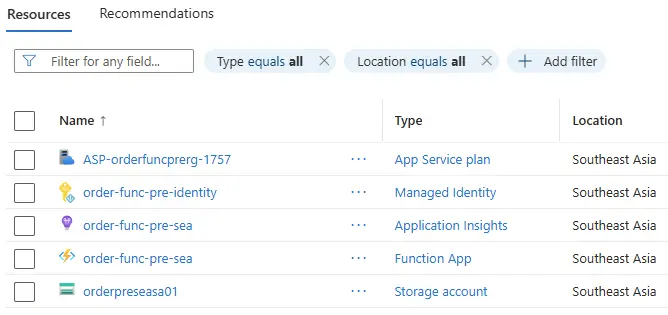
Contents of Resource group order-func-pre-rg on Azure:
What if a resource already exists in Azure?
Before any local or Azure setup, the script checks whether Azure resources with the specified names already exist. If the resource group, storage account, managed identity, or function app already exists, the script aborts.
Example of output with existing Azure resources:
:: [Step] :: check Azure resource names are available
failure: Azure Function setup and deploy
Azure resource(s) already exist: resource group 'order-func-pre-rg'; storage account 'orderpreseasa01'; managed identity 'order-func-pre-identity' in resource group 'order-func-pre-rg'; function app 'order-func-pre-sea'.
Aborting before local or Azure setup.
Deployment sanity checks
Logs of the script CreateAndDeployAzureFunction.ps1 already provide a summary of the Function App deployment success or failure. An additional easy manual sanity check is to check the Function App availability using az functionapp function list.
$resourceGroupName = "order-func-pre-rg"
$functionAppName = "order-func-pre-sea"

az functionapp function list `
    --resource-group $resourceGroupName `
    --name $functionAppName | ConvertFrom-Json |
    Select-Object `
    @{Name="Name";Expression={$_.config.name}},
    @{Name="Route";Expression={($_.config.bindings | Where-Object type -eq "httpTrigger").route}},
    @{Name="InvokeUrlTemplate";Expression={$_.invokeUrlTemplate}} |
    Format-Table -AutoSize
Name Route InvokeUrlTemplate ---- ----- ----------------- order_http_pre order_http_pre https://order-func-pre-sea.azurewebsites.net/api/order_http_p…